
Ruko sent us this R1 free of charge for review. It did not see this article before publication and had no say in the verdict. The Amazon link below is a plain search link, not an affiliate link, and there are no sponsored links on this page.
The Ruko R1 Mini Robot Dog costs $49.99, weighs about 250 g, and does 360° flips in four directions without ever needing a hand to get back on its feet. It is the second robot we have tested in person after Stack-chan, and it is the cheapest machine in our catalog by a wide margin. The short version of our verdict: this is a toy, not a robot, and it is a very good toy.
That distinction is the whole review, so I want to be precise about it. On this site a robot is a machine that can take an instruction, work out what it means and then act on it. The R1 cannot do that. It has no microphone, no camera and no AI; if you say "sit", nothing happens. Everything it does, it does because someone is pressing a button or tilting a wrist. But what it does when you press that button is fast, physical and genuinely funny, and it gets a child aged three and up moving for hours. For $50 that is a fair trade, and I think it does something more useful than a lot of pricier machines: it gives a child a first, physical idea of what a robot is going to be.
The short version
• What it is: a 160 × 104 × 86 mm, 250 g four-legged toy dog that flips, rolls, dances and does push-ups on command, for children aged 3+.
• Price: $49.99 at ruko.net (listed against a $59.99 compare-at price) and on Amazon US.
• Controls: a 2.4 GHz handheld remote plus a gesture-sensing wrist watch. One pairs at a time.
• What it can't do: hear you, see you, learn, or connect to anything. No app, no Wi-Fi, no AI.
• Battery: about 50 minutes of play from a 2-hour USB charge. Built in, not replaceable.
• Score: 52.4/100 as a robot pet, hands-on tested. Low on intelligence, high on value.
• Best for: a first robot for a small child, or a parent who wants to look very cool for an afternoon.
Full Ruko R1 spec page and scores → · About Ruko →
What Ruko Actually Sells You for $49.99
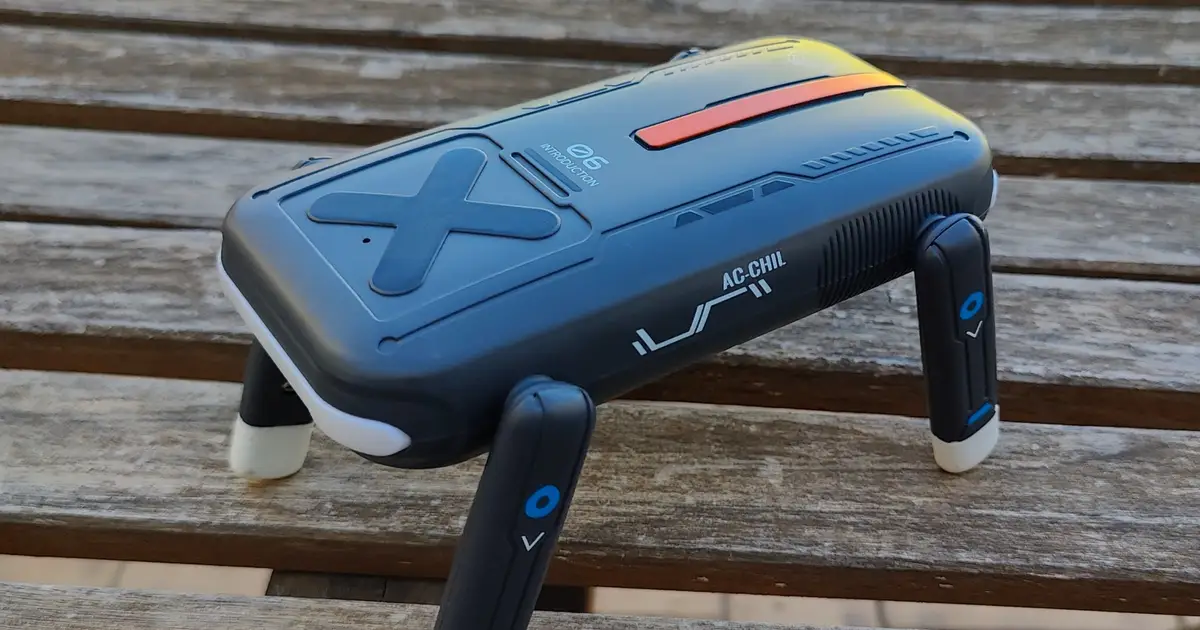
Ruko is a Shenzhen company founded in 2017 that made its name with camera drones on Amazon and has been moving into robot toys. The R1, launched on 29 September 2026, is its smallest robot dog so far: 6.3 × 4.1 × 3.4 inches, which is 160 × 104 × 86 mm, or roughly a large smartphone standing on four stubby legs. At 250 g it weighs about the same as that phone, so a three-year-old can carry it in one hand and it fits in a school backpack.
The body is what Ruko calls a tumbler design. The underside is rounded and the mass sits low, so when the dog lands upside down after a flip, or a child knocks it over, it rocks back onto its feet by itself. In the box you get the dog, a USB charging cable, a game-style 2.4 GHz remote that takes two AAA batteries (not included), and a wrist watch with a tilt sensor and a fingertip button. The manual lists the moves: flips forward, backward, left and right, rolls left and right, push-ups, seven swimming motions, a kung fu routine with music, three dances, a handshake, a greeting, a potty gag, and four short bedtime stories. Four volume levels, an auto-sleep timer, and a programming button that chains ten or more of those moves into a loop.
| Specification | Ruko R1 Mini Robot Dog |
|---|---|
| Price | $49.99 (ruko.net, Oct 2026; $59.99 compare-at) · Amazon US |
| Age rating | 3+ |
| Dimensions | 6.3 × 4.1 × 3.4 in (160 × 104 × 86 mm) |
| Weight | ≈ 250 g |
| Controls | 2.4 GHz remote (2× AAA, not included) + gesture-sensing watch; one paired at a time |
| Movement | 360° flips in 4 directions, rolls, push-ups, 7 swimming moves, walk/turn via joystick |
| Routines | Kung fu, 3 dances, handshake, hello, potty, 4 bedtime stories |
| Programming | P button chains 10+ actions into a repeating sequence |
| Sensors | Touch sensors on the back; self-righting tumbler body |
| Audio | Built-in speaker, 4 volume levels |
| Battery | Built-in rechargeable, not user-replaceable; ≈ 50 min play, ≈ 2 h charge (5V/2A USB) |
| Connectivity | None. No app, Wi-Fi, Bluetooth, camera or microphone |
| Model number | 8030 |
What Happened When We Handed Over the Remote
Setup is the shortest I have done for anything with a motor in it. Charge the dog over USB, slide the power switch, switch on the remote and the two find each other. There is no app to install, no account to create and no Wi-Fi password to type, which with a small child waiting next to you is worth more than any feature on the spec sheet.
The flips are the product
Press a shoulder button and the R1 throws itself into a full 360° flip, forward or backward, and lands on its feet; the side flips and the rolls have their own buttons. The first time it happens in a living room, everyone in the room looks up. The moves are quick and have real snap to them; the dog does not drift through a trick, it commits. And because of the tumbler body, when a flip does go wrong, the dog rocks itself upright and waits for the next command. That self-righting is the detail that turns the R1 from a toy you supervise into a toy you can leave a child alone with. Nobody has to bend down and reset it, so the game never stops.
The repertoire is bigger than I expected at this price. The push-ups are a good gag, the kung fu routine comes with its own music, and the swimming moves, performed on dry land, make less sense on a floor and more sense once a child decides the rug is a lake. That is the pattern with the R1: the moves are fixed, but the situations children invent around them are not, and that is where the hours of play come from.
The gesture watch is the trick parents will enjoy most
The second controller is a wrist watch with a tilt sensor. Tilt your hand forward and the dog walks; tilt it sideways and it turns. Press the fingertip button and you switch into flip mode, where the same tilts trigger stunts. It feels a little like conducting, and it is the part of the R1 that makes a child decide their parent has powers. The limitation is that only one controller can be paired at a time, so the watch and the remote cannot be used together; you pick one per session.
The programming button is a small, real idea
Press P on the remote, then tap a series of moves, and the dog executes them in order and keeps looping. The stop button cannot be part of a sequence, so a routine runs until you cancel it. There is no screen, no blocks, no code. But a four-year-old who works out that "flip, dance, push-up, flip" is a different show from "push-up, flip, flip, dance" has just met sequencing, which is the first idea in programming. It is a long way from Scratch, and a long way further from a Petoi Bittle running Python. It is also available to a three-year-old, which neither of those is.
What it cannot do: hear you
This is where the toy stops being a robot. There is no microphone, so voice commands do not exist. There is no camera, so it does not know where you are or who you are. The touch sensors on its back trigger a fixed reaction, the same one every time, and nothing it does today changes what it does tomorrow. The four bedtime stories are recordings. If you want a machine that listens, understands and answers, the cheapest thing in our catalog that does it is Stack-chan at $99, and the cheapest one with legs that does it is a very different budget.
I do not hold this against the R1, because Ruko does not claim otherwise. The box says remote control and gesture sensing, and that is exactly what you get. But it is the reason the word "robot" in the product name should be read loosely.
Toy or Robot? Why the Answer Matters for Your Wallet
In our scoring, robot pets are rated 29% on how real their behaviour feels, 25% on how they respond to touch, voice and learning, 15% on ease of use, 14% on build and battery, 12% on value and 5% on their ecosystem. The R1 wins ease of use and value outright and loses responsiveness almost completely, because two of its three responsiveness axes, voice and learning, are simply absent. That is how a product I would happily recommend ends up at 52.4 out of 100, which our scale calls Average. The number is honest. It measures the R1 against machines that can hear you, and the R1 cannot.
The useful question for a buyer is different: what do you want the $50 to do? If you want a companion that reacts to your child, learns names and answers back, the R1 is the wrong product, and so is anything else under about $200. If you want a child to run around a living room for an afternoon, laugh out loud, invent games, and come away with a feeling of what a robot is, the R1 does that for less than the price of a video game. The battery figure is the one practical catch: 50 minutes of play from a two-hour charge means it will go flat mid-session, and because the pack is sealed, the toy's lifespan is the battery's lifespan.
The R1 does not understand a single word you say to it. Watching a child try anyway, and then discover the remote does what their voice could not, is a better lesson about where robotics is in 2026 than most explainers.
What a Child Learns from a Dog That Can't Listen
Here is the part I keep thinking about. A child who grows up with the R1 learns, physically, what a quadruped does: it balances on four legs, it falls, it gets back up, it has a repertoire of motions and someone has to tell it which one to run. That is a surprisingly accurate model of the robot dogs being sold to adults right now, from the $1,600 Unitree Go2 upward. The difference is in the instruction channel, a controller today, a voice and a camera tomorrow, and in who writes the moves.
I think the robots these children own as teenagers will look a lot like the R1 and work very differently. They will take spoken orders, because the speech and language models that do that already run on a phone. And their movements will not be a fixed list burned into a chip at the factory; they will be downloadable, and many of them will be written by other owners. We said as much when Unitree opened UniStore, its skill marketplace, and when we picked out the five skills worth installing first: once the hardware is cheap and the controller is a model rather than a remote, the moves become software, and software gets shared. We track that already in our robot skills catalog. A child who has chained "flip, dance, push-up" on an R1 will not find it strange, ten years from now, to download a new dance for the family robot or to teach it one.
That is why I call the R1 a good introductory robot even though I have just spent several paragraphs explaining that it is not a robot. It is the first rung. It teaches the body before the brain, which is the order the industry learned it in too.
Who Should Buy It, and Who Should Spend More
Buy the R1 if you have a child between about three and eight, you want a gift that gets used rather than displayed, and you are not looking for intelligence. It also works as a desk toy for an adult who finds the flips as funny as I do, and it is small enough to travel. At $49.99 the risk is low and the payoff, measured in hours of play, is high.
Spend more if you want interaction rather than entertainment. Eilik at $149 has no AI either but has a face with over a thousand expressions and reacts to touch in ways that feel like mood. Miko 3 at $299 talks to a child and has parental controls, and is the better choice if the goal is a companion rather than a toy. Loona at $499 is the robot pet with a camera and real autonomy, and the one to look at if what you actually want is the R1's energy plus a brain. For children who are ready to type, the Petoi Bittle at $349 is a real programmable quadruped, with all the assembly and patience that implies. Our guide to the best robot pets for kids in 2026 compares all of them by age.
The Verdict
The Ruko R1 is the cheapest thing we have tested and the one that produced the most laughter per dollar. It flips in four directions, picks itself up every time, takes orders from a wrist watch and lets a small child build a routine out of its moves. It cannot hear, see or learn, and we score it accordingly: 52.4 out of 100 as a robot pet, dragged down by the intelligence it does not have and lifted by a price that makes that forgivable.
Judge it as a robot and it is a toy. Judge it as a toy and it is one of the best introductions to robots a young child can get, and the parent holding the remote will, for one afternoon at least, be the coolest person in the house.
- $49.99, the cheapest robot in our catalog
- Four-way 360° flips with real snap, plus rolls, push-ups and dances
- Self-righting body: the game never stops for a reset
- The gesture watch is a genuinely fun way to drive a toy
- The programming button teaches sequencing to a three-year-old
- No app, no account, no Wi-Fi. Charge, switch on, play
- No microphone, camera or AI; it cannot hear an order or act on one
- About 50 minutes of play per 2-hour charge, and the battery is sealed
- Two AAA batteries for the remote are not in the box
- Only one controller pairs at a time
- Nothing to update, expand or download; what ships is what you get
Full Ruko R1 spec page and scores → · Search Amazon for the Ruko R1 ↗ · Ruko's R1 product page ↗